

Course Reserves
Course Reserves
Students, your instructors may put items on course reserve. These items include:
- Books and book chapters
- Articles
- Audiovisual materials
- Educational kits
Reserve items can be checked out for short periods such as 2 hours, 4 hours, or 1 day. Some items must stay in the library. Visit the help desk at Michener Library or Skinner Music Library to check out course reserves.
Electronic Reserves
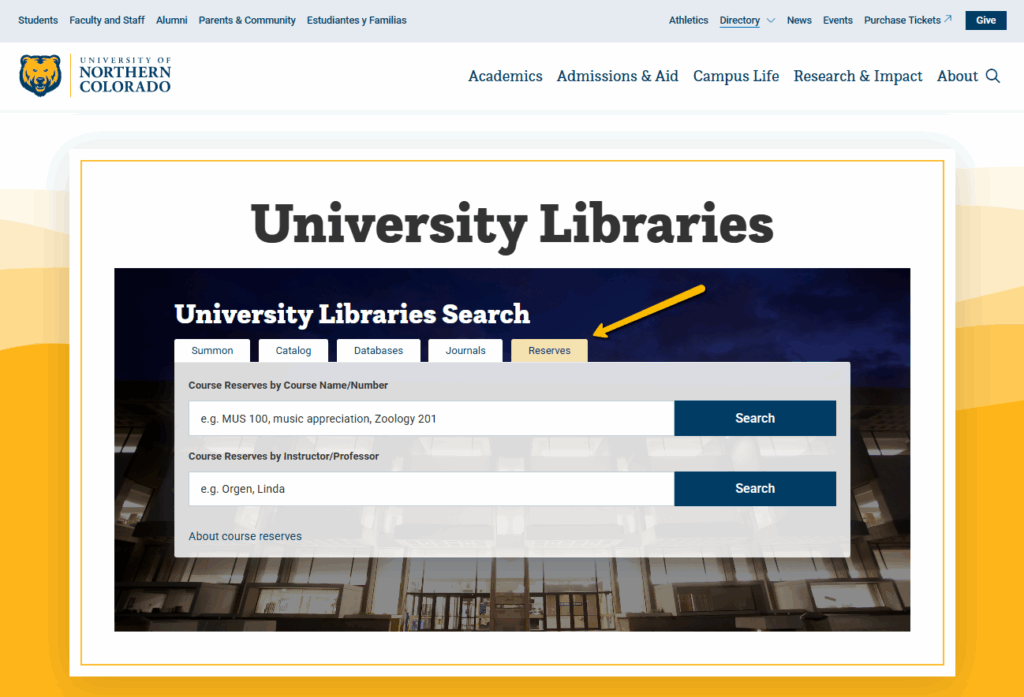
You can read electronic reserves (e-reserves) online. Here’s how to find electronic reserves for your course. You will need to know your course abbreviation (such as NURS for Nursing) or your instructor’s name.
- Go to the University Libraries home page.
- You will see search box at the top of the page. Click on the Reserves tab above this box. In the screen shot, there’s an arrow pointing to the Reserves tab.
- Enter your course abbreviation. If you know your course number, you can enter that too. Or, enter your instructor’s last name.
- Click Search.
- Click View or Print [name of article] to access the item.
If you’re teaching a course and want to put an item on reserve, please visit our Teaching Resources page.
Stay Connected
Follow UNC Libraries on social media for the latest announcements, events, and news.