

Card Office
Administrative Department
Did you know that your UNC Card is much more than a normal identification card – it is your connection to campus life while you are attending the University of Northern Colorado. You can use the card as a FREE GET (Greeley/Evans Bus System) pass, library card, door access, attend sporting events on campus free, dining meal swipe card, and in many other convenient ways, such as discounts at many of your local retail stores and restaurants.
Check out the ways you can use your Bear Identification Card here!
Monday-Friday
8:00am-4:30pm
Spring Break Office Hours
March 16-March 20
9:00am-3:00pm
Card Office Helpful Information
The UNC Card and Business Office is open for walk-in services. If you prefer to continue to use electronic photo submission, that is also acceptable. You have the option of obtaining your student I.D. Card by coming into the UNC Card Office during open hours OR via electronic photo submission. For first time students choosing the electronic submission option, please complete the Student ID Questionnaire. You will need to log in using your admissions credentials.
For graduate students and international students choosing the electronic submission option, please send an email to: UNC Card Office. Please be sure to use a computer or mobile device with Outlook or other email software installed.
Once you’ve submitted all the required materials, you will receive confirmation that your card request has been received and printed.
If you are attending orientation in person, we will hold your I.D. for pickup on your orientation date. If you will not be attending orientation in person, we can mail your official UNC I.D. Card to your permanent address on file with the University. Please verify your address on MyUNC and make sure it matches what you are submitting in your request. If for any reason we cannot mail your card, you will receive an email notification.
Your “Key” to Campus:
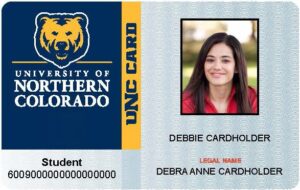
If we miss you during office hours, please know you can eat by going to dining services and downloading the mobile id. Visit your front desk to have a lockout card issued to you so you can still access your residence hall.
If your card is lost or stolen, report it to the Card Office as soon as possible. Most UNC Cards are linked to bank accounts. For your protection it is important you notify us in the event of a lost or stolen card.
Your UNC I.D. card can be replaced for a minimal charge of $20.00. This charge will be added to your UNC tuition account and will need to be paid through ebill or at Bear Central in the Campus Commons.
If you card is broken, bring all the pieces to the Card Office and we can replace your card at no charge. If you wish to take a new picture, you will be charged a $20.00 replacement fee.
To set up Direct Deposit for net financial aid proceeds or student payroll, print out the form below, complete the information, attach a voided preprinted check with your name on it from your bank account or an official letter or document from your bank, and return the form to the UNC Card Office located in the University Center. If you do not use checks, obtain a letter from your bank stating the bank account belongs to you, and has the routing number and account number.
Adding in handwritten names is not allowed. Handwritten bank account and routing information will also not be accepted.
Completed Direct Deposits can be emailed to card.office@unco.edu but must come from an OFFICIAL UNCO email address. Emails from outside the university will not be opened.
You may also mail your form to the following address:
University of Northern ColoradoCard OfficeCampus Box 2Greeley, CO 80639
or Fax your form to 970-351-3051
If you have any questions about setting up Direct Deposit or questions about this form, please call the UNC Card Office at 970-351-2821.
If you experience door access problems, email Facilities Management at service.center@unco.edu or call 970-351-2446. If you are living in a residence hall with card swipe access for your room, you will need to stop at the front desk of your residence hall to have your card re-encoded. If you have questions, please email card.office@unco.edu.
If you wish to add a “Preferred Name” to your card, you can do so at by filling out the required form with the Office of the Registrar. The card replacement fee of $20.00 will be added to your student bill. For more information visit the Office of the Registrar Name Change Policies and Procedures.
Please submit an electronic photo that meets the below standards. If you have any questions, please refer to the U.S. Passport Office photo guidelines:
- Color photo only
- Format to approximately 2×2 inches (51×51 mm) in size
- Only head and shoulder shot taken within the last 6 months
- Photo must be taken in front of a plain white or off white, light gray, or light blue background
- Photo should be in a jpg format and saved with first and last name dot jpg (example – klawzbear.jpg)
- Do not include friends, pets, or props in the photo
- No headphones or wireless devices – only photo of student in the picture
- Taken with a natural smile, and with both eyes open
- Taken in clothing that you normally wear on a daily basis
- Uniforms, clothing that looks like a uniform, and camouflage attire should not be worn in photos except in the case of religious attire that is worn daily.
- You may only wear a hat or head covering if you wear it daily for religious purposes. Your full face must be visible and your head covering cannot obscure your hairline or cast shadows on your face.
- If you normally wear glasses, a hearing device or similar articles, they may be worn for your photo. No dark glasses and no glasses with dark lenses.
- Please fill out and submit the Student I.D. Questionnaire.
- If you have already received or requested a student I.D., check the box to submit the questionnaire and mark your enrollment prep checklist item complete.
- If you are submitting a request for the first time, please submit a photocopy of a Valid Government Issued Photo I.D. as well as a photo of yourself that follows the below photo standards.
- You must be registered for classes prior to submitting your request. You must submit your request from your active Bear email account. We cannot guarantee that requests from an outside email address will be received or opened.
- In your email, you must include your bear number, a phone number where you can be reached, and your current mailing address. Please note, if your mailing address does not match what you have listed in MyUNC, we will hold your card until it is updated. Attach a copy of your driver’s license or government issued I.D. for verification of your identity. Also attach a jpg photo of yourself using the following criteria.