
Jump to main content

New Student Registration for Advisors

Once students confirm they are coming to UNC, a New Student Orientation and an Advising tab appear in their Admissions Portal. From there, they can sign-up for a session of EACH and see what tasks to complete in preparation. Orientation and Registration are separate processes: students must attend Registration and should attend Orientation. Students can also access this information through the Registration and the Orientation Websites.

This page will be updated with Spring 2022 processes as Spring Start nears.


Access Tools and Documents for serving incoming students:

Access the archive of documents with information on:

  • New Student Days Overview (Fall 2021)
  • Planning Document published by the Registrar (Fall 2021)
  • Math, Writing, and Language Placement Guides
  • COVID Vaccination Talking Points
  • Slate Access Help Guide

Access the NSR Library


Quick Question Bank
  • How do students register for sessions?

    Confirmed students receive rolling emails to sign up for an NSR session through their Admissions (Slate) portal. Once they register, students receive a confirmation email, 3-day reminder, and a Day-Of email and text.

    If students are registering for individual sessions with you, they are referred to the Booking Link or central email for your area.

  • Where do I find the list of students registered for the upcoming session?

    The people with Slate Access in your college can download the registration lists from their Slate Advising Portal of events.

    Registration closes 7 days to the start time of the session. After the session, your Slate Access designee is responsible for "Concluding the Event" within 4 hours of the end-time.

    First, you click the "Launch Check In" and then "Conclude the Event" at the bottom of the event page.

  • What is the process for Student Athletes and CHE students?

    Student-Athlete Academic Success staff have contacted students who participate as UNC student athletes. After advising, refer students back to their SAAS coach to remove the athlete hold and finalize their schedule.

    CHE staff have contacted students and explained the CHE cohorts. You still need to keep in mind the cohort courses for any students who share they are part of CHE with you.

  • What is the process for Changing Majors during an NSR session?

    The designated person with access to the "Advising and Registration Group" in Teams will confirm with the NEW college if switching sessions is an option. If PVA or SOAR is not available that day, follow up with Katie Runkel and Chris Freeman directly.

    Use the Who's My Advisor Site to find the correct new college.

    NOTE: Starting this fall students can't declare Nursing Exploring without a 3.0 or higher high school GPA. Confirm their HS GPA before sending them to NHS. Some alternatives to Nursing may be Human Services, Nutrition or Psychology. They can also be Exploring Liberal Arts and take Nursing pre-req courses.

    NOTE: Art and Design majors can be declared by any student with interest in the area. Music and Theatre Arts & Dance require an audition and school-specific application. You can tell students:

    Many of the PVA programs are gated, if you'd like to speak with someone about your options in PVA, please contact Katie Runkel or email pva.advising@unco.edu and they will follow up with you.
     

    If the switch works for the new college, provide the Zoom Link to the student. The new college needs to complete the running Excel document in the Teams for the Registrar's Office contacts to update the student record.

    Jen Rehnberg will also view this update and can override the student into the new session in Slate to ensure they receive the follow-up communication correctly. The major change information must be added to the Spreadsheet in the Advising and Registration Group (the photo with Snoop) within 3 hours from the end of the session. Please note if the student actually attended another session (was able to switch to the new college's Zoom).

  • Who will be on Teams each session and where do I go for help?

    Advisors from each college (except the days that PVA and SOAR are not hosting sessions), Registrar Office staff, Admissions staff, Orientation Leaders, SFS staff, and the professional practice coordinator.

    Communication and Support:

    Advisors can use the NSR Fun and Meme Chat (invited via Teams) for connection and non-urgent questions.

    Advisors should use the Advising and Registration Group (Team Channel) to post urgent registration questions, share a Major Change, ask about Immunization Holds. 

  • How do I recommend and advise for Math and English?

    Both the Math and Written Communication placements pushed through Banner (SOATEST) and into Slate. 

    The recommendations are provided on the spreadsheet pulled from Slate with student registration information.

    Math
    • The Slate query lists the recommended Math course
    • You can override a student into MATH 120 if their ACT is 19+ or SAT is 500+ (they do not need to take ALEKS). Use SFASRPO in Banner for overrides.
    • If the ALEKS score is a 29 or lower the student needs to take MATH 119 with 120.
    • Students can register for STAT 150 this year without ALEKS.
    Written Communication
    • The Slate query provides the recommendation of 122, 132 along with 122, or 123
    • Encourage a linked ENG 122/132 combo for students with the recommendation
    • AP scores will be available in late July, so ask your student if they are expecting any Literature credits.
    • Students can register for ENG 123 with an SAT Verbal with a minimum score of 630 or ACT English with a minimum score of 30 or SAT Reading Test with a minimum score of 34.
    • Sections of ENG 132 are linked with ENG 122. Use the table below to assist with registration:
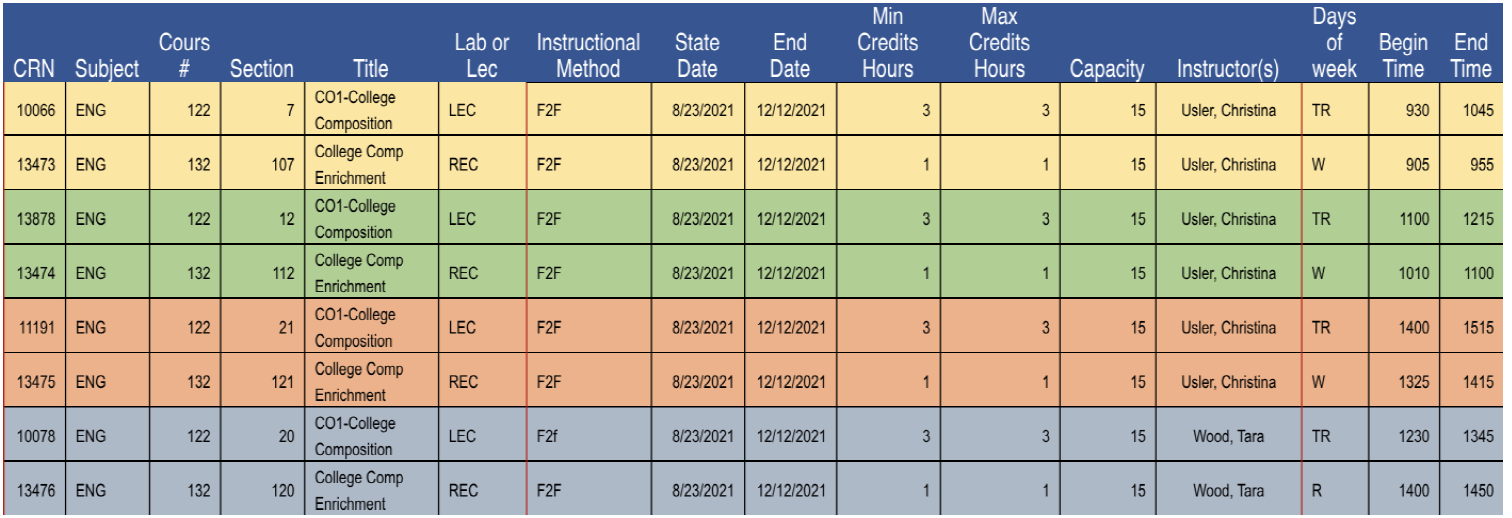
    A table of the linked CRNs for the ENG 122 and 132 courses- There are four linked options as follows: 10066 and 13473, 13878 and 13474, 11191 and 13475, 10078 and 13476

  • How do I refresh Degree Works to check that students are registering correctly?

    Click on the Process Button : Do not just reload the webpage from your web-browser.
     The Process Icon in Degree Works. It is blue text inside an oval button with a blue border and says Process.

  • How do I change my Zoom background to our NSR standard? And why is the text backwards?

    Access your Zoom background, which includes your name and information, from the library.

    Pre-meeting:
    1. In your Zoom application (the downloaded version), click the settings icon in the upper right corner.
    2. Select Background and Filters and Add Image.
    3. Drag your Zoom Background from the library into the Zoom application.
    During the meeting:
    1. In the Zoom meeting, click on the small arrow on your video toggle.
    2. Select Choose Virtual Background, Add Image, and Drag your Zoom Background from the library into Zoom.

    If your background is cut off or the text is backwards, check your video settings. You need to uncheck the options for "Mirror Video" and "Original Ratio." If your camera's aspect ratio is not 16:9, email Hayley.Blackburn@unco.edu with your aspect ratio to receive a configured background.

  • What happens if a student has the immunization hold on their account?

    The query from Slate will show you if students have turned their immunization records (but the hold may not have been processed yet). The column will say "Received" or blank depending on if they uploaded their forms.

    If they have not submitted the MMR forms, they will be able to register. We still need the immunization documentation from students but it will not be required to register for this Fall.

  • What do students call Slate/Admissions?

    Refer to the portal as the "Bear App." If you have documents that your students receive through Slate, know that they received an email the day before with instructions to access the schedule or advising sheet.

  • Where do students go for technology help and support?

    TSC is prepared to provide assistance on each of the NSR dates. If you have students struggling to connect, download the latest of versions of Zoom, or other technical issues they need to call 970-351-HELP.

    You can also provide Zoom help from the IT Guides

  • How do students register for new sessions (no major change)?

    If the session is in advance, students can cancel and register for new sessions through their Bear App (Slate/Admissions Portal).

    If the student reaches out the day of their NSR (or during the event), your Director will cancel the student's registration in the Slate Session by clicking "Cancel Registration." That triggers an email to the student telling them it has been cancelled and to re-register. 

    If you have issues or questions, contact Jennifer Rehnberg through Teams.